CONTOUR DIABETES app (US)
Ascensia Diabetes CareMedical
3.31.70K Reviews
- Version
- 3.5.0
- Installs
- 100.00K
- Age Rating
- Everyone
Screenshots
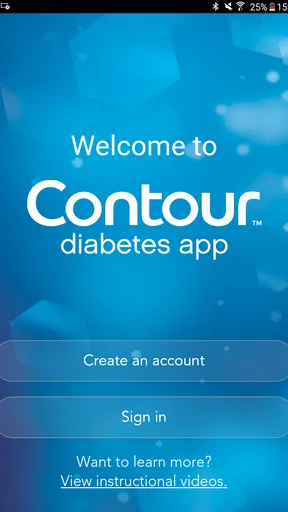
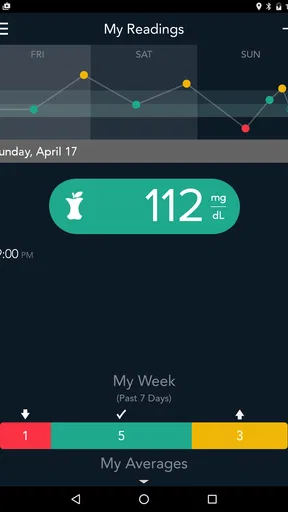
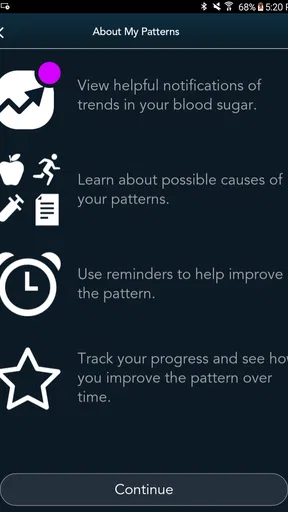
Our Review of CONTOUR DIABETES app (US)
 Analysis by Appyee
Managing blood glucose is rarely difficult because of one dramatic task. The real challenge is keeping small actions consistent: checking a reading, remembering what was eaten, noticing a pattern, and having useful information ready for a healthcare conversation. CONTOUR DIABETES is designed for that everyday routine. I see it as a focused medical app for people who want their blood glucose monitoring to feel more organized without turning their phone into an overwhelming health dashboard.
The app comes from Ascensia Diabetes Care, and its purpose is closely tied to the CONTOUR monitoring ecosystem. It is free, rated for Everyone, and supports devices running Android 5.0 or later. The current version is 3.5.0, while the app has been available since late 2016. Those details matter less than the practical question: will it make your own tracking routine easier, or will it add another layer to maintain?
What I would consider before choosing it
My first decision criterion would be compatibility with the blood glucose meter already used at home. This is not the kind of app I would choose simply because it has a clean icon or a free download. Its usefulness depends on how naturally it fits into the way readings are collected. If your meter and phone routine already belong to the CONTOUR family, the app makes much more sense than a generic diary that asks you to recreate every result manually.
The second criterion is what you actually need from a log. Some people want a straightforward record of readings and notes. Others need a broader health platform that combines glucose with meals, exercise, medication, appointments, and data from several devices. CONTOUR DIABETES is most appealing when blood glucose is the center of the workflow rather than one small tile in a large wellness dashboard.
I would also think about who needs to read the information later. A useful log is not only for the moment when a number appears on screen. It can help you remember what was happening around that reading and give you a clearer starting point when discussing patterns with a clinician. That makes organization and consistency more important than decorative charts or a long list of lifestyle features.
Finally, consider patience. Any connected monitoring setup can involve permissions, pairing, account steps, or occasional troubleshooting. I would not install this expecting the phone to replace the meter or clinical advice. It is a companion for recording and reviewing information, not a diagnosis tool. The best result comes from treating the app as a routine aid, not as an automated medical decision-maker.
The first few days: setup is part of the decision
When I evaluate an app like this, I pay attention to the first week rather than the first five minutes. A glucose log only becomes useful if entering or receiving readings is simple enough to repeat on busy days. I would begin by installing it on the phone I actually carry, checking that the operating system is supported, and keeping the meter nearby during setup. That avoids the common mistake of creating an account or exploring screens before confirming that the intended measuring workflow is practical.
I would also decide on a naming habit for notes before using the app seriously. For example, I might use brief, consistent descriptions such as “before breakfast,” “after dinner,” or “exercise day.” The point is not to write an essay beside every result. It is to make later patterns easier to recognize. A short, repeatable note can be more useful than an occasional detailed entry followed by several days of silence.
Another practical tip is to test the complete routine at a calm time: take a normal reading, make sure it appears where expected, add context, and look at how that information is reviewed later. This exposes friction early. If the process feels awkward when there is no pressure, it is unlikely to feel better during a rushed morning or while traveling.
Where the focused approach works well
The strongest reason to choose CONTOUR DIABETES is focus. Instead of asking you to build a general health profile first, it keeps attention on blood glucose monitoring. For someone who already has a CONTOUR meter and wants a digital record, that narrow purpose can be an advantage. There are fewer unrelated screens competing for attention, and the app’s role is easier to understand.
I particularly like this kind of setup for people who are moving away from paper notes. A notebook can work, but it is easy to forget entries, lose pages, or struggle to see a pattern across several weeks. A phone-based record is more available during ordinary routines, and a structured app can make reviewing information less dependent on handwriting or memory.
It can also suit a person who wants to prepare for a healthcare appointment without trying to interpret every reading alone. Before an appointment, I would review recent entries and add context to the readings that seem important: unusual meals, a disrupted schedule, illness, or a change in activity. That does not turn the app into a clinician, but it can help me arrive with a more accurate account of what happened.
A less obvious strength is the value of consistency over complexity. People often choose health apps by counting features, then stop using them because every entry feels like a form. A glucose-focused companion can be better when the main goal is simply to keep the monitoring habit alive. If the app reduces the distance between taking a reading and recording it, that practical simplicity may matter more than advanced lifestyle analysis.
A realistic daily routine
Imagine a weekday morning when breakfast is rushed and the rest of the day is already planned. I would take the reading with the meter, open the app if needed, confirm the result, and add a short context note rather than relying on memory. Later, after dinner, I could look back at the day and see the readings alongside those brief reminders. The benefit is not that the app tells me what the number means medically. The benefit is that I have a clearer record of what was happening when it occurred.
On a weekend, I might use the same routine around a different schedule. Perhaps a meal is later than usual or activity is higher. Recording that context makes the log more honest than a collection of isolated numbers. This is one of the most useful habits I would recommend: use notes to explain changes in routine, not to document every minor detail.
For a caregiver or family member helping someone stay organized, the app may provide a more dependable record than scattered messages or loose paper. Still, I would be careful about assuming that a digital log automatically solves communication. The person using the app should understand what is being recorded and who is responsible for reviewing it. The app supports that conversation; it does not replace it.
Where broader alternatives may fit better
I would look elsewhere if my main goal were a complete health-management platform. A broader diabetes app may be a better fit for someone who wants food tracking, exercise records, medication reminders, weight trends, and information from several health devices in one place. I am not saying those alternatives are automatically better. They simply serve a different purpose, and their wider scope may be worth the extra setup for users who want one central dashboard.
A manual spreadsheet or notes app may also be enough for someone who prefers total flexibility. That route can work when readings are entered infrequently or when the user already has a carefully designed system. The trade-off is that a general notes tool does not provide the same focused monitoring experience, and it places more responsibility on the user to keep labels, dates, and context consistent.
Paper remains a reasonable option for people who do not want health information on a phone or who find digital setup frustrating. It is also useful as a temporary backup when a phone battery is low or a device is unavailable. I would not treat paper as outdated simply because an app exists. The better system is the one that is actually used accurately and regularly.
There is another important exception: people whose needs center on continuous data, clinical integration, or specialized treatment workflows should choose tools based on guidance from their healthcare team. A focused blood glucose log may be helpful alongside those systems, but it should not be assumed to provide the same functions. If a clinician has asked for a particular format or device connection, that instruction should take priority over convenience.
Friction, maintenance, and the cost of switching
The download itself is free, which removes an obvious financial barrier. The more meaningful cost is attention. Switching from a paper log or another app means deciding what history is worth preserving, learning a new routine, and possibly repeating information that is not transferred automatically. Before changing systems, I would keep the old record available and avoid deleting it until I had confirmed that the new workflow was dependable.
I would also avoid switching immediately before an important appointment unless there is a strong reason. A new system may feel promising, but a short period of unfamiliar entries can make comparisons harder. A gradual transition is safer: use the new app for ordinary readings while retaining the previous method long enough to make sure the routine is stable.
Another trade-off is phone dependence. A paper log is visible without a charged device, while an app requires the phone to be available and working. If you travel, spend time outdoors, or regularly leave your phone behind, it is sensible to have a simple backup method. That is not a criticism unique to this app; it is a practical limitation of digital tracking in general.
Its average rating is 3.3 from around three thousand ratings, with roughly one thousand seven hundred written reviews. I would read that as a reason to set realistic expectations rather than as a simple verdict. A medical companion can be useful and still frustrate some users because of pairing, device compatibility, account access, or differences in personal routines. Before committing fully, I would test the exact path I plan to use and pay attention to whether it saves time after the initial setup.
The app has passed one hundred thousand installs, which suggests that it is not an obscure experiment. Even so, popularity does not guarantee that it will match every meter, phone, or personal preference. I would use the install as reassurance that the product has an established audience, not as a substitute for checking whether its workflow suits me.
Who should use it, and who should skip it
I would recommend trying CONTOUR DIABETES to someone who uses a compatible CONTOUR monitoring setup, wants a dedicated blood glucose record, and prefers keeping the routine on a phone. It is especially sensible for a person replacing a paper diary, someone who wants better context around readings, or a user preparing to discuss patterns with a healthcare professional.
I would be more cautious for someone who wants extensive nutrition analysis, a single place for many kinds of health data, or a highly customizable spreadsheet-like system. That user may feel constrained by a focused app, even if the basic monitoring experience is solid. I would also skip it as a primary choice if the required meter and phone workflow do not fit together comfortably.
People new to blood glucose monitoring should remember that an app cannot tell them how to respond to a reading. It can help preserve information, but interpretation belongs in the appropriate medical context. If a result is concerning or symptoms are present, I would follow professional medical guidance rather than waiting for an app screen to provide reassurance.
My recommendation after weighing the alternatives
My view is straightforward: CONTOUR DIABETES is worth considering when you want a focused companion for blood glucose monitoring and your existing CONTOUR equipment makes the pairing natural. Its main value is not visual novelty. It is the chance to turn scattered readings into a more consistent record that can support everyday awareness and better conversations with a clinician.
I would not choose it merely because it is free, and I would not dismiss it because it lacks the ambition of a full wellness platform. The right question is whether a dedicated glucose workflow is what you need. If the answer is yes, I would install it, test one complete reading-and-review cycle, and use it for several ordinary days before deciding. That trial reveals more than browsing feature lists.
For me, the deciding advantage is the balance between a specific medical purpose and a manageable daily habit. The deciding weakness is that its usefulness depends heavily on fit: the meter, phone, recording style, and expectations all need to line up. Choose it for dependable organization around glucose readings, not for broad lifestyle management or medical judgment.
Ascensia Diabetes Care has built this app around a clear job, and that clarity is its strongest reason to exist. If your needs match that job, it can become a quiet, practical part of the day rather than another health project to maintain. If you need a wider system, a manual log or a more comprehensive diabetes platform may serve you better. In either case, the best choice is the one that helps you record information accurately and keep using the system when real life becomes busy.
Verdict
Strengths of CONTOUR DIABETES app (US)
- Syncs glucose readings automatically from compatible CONTOUR meters.
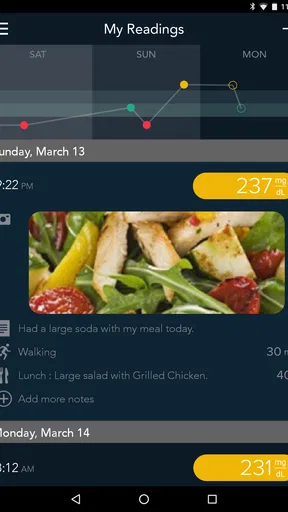
- Clear charts help identify patterns in blood sugar levels.
- Supports reminders for testing, meals, and medication.
- Allows notes about food, activity, and other health factors.
- Reports can be shared with healthcare professionals when needed.
Limitations of CONTOUR DIABETES app (US)
- Works only with selected CONTOUR meters and compatible mobile devices.
- Some features may vary depending on country, meter model, or app version.
- Bluetooth pairing can occasionally require troubleshooting.
- Data entry may become time-consuming for users tracking many details.
- The app is not a substitute for professional medical advice or diagnosis.
Similar Picks in This Category
View All
WebMD: Symptom Checker
WebMD, LLC4.1

Microphone Amplifier
DOSA Apps4.2

Anatomy Learning - 3D Anatomy
3D Medical OU4.5

Period Tracker and Calendar
SimpleInnovation4.9

GoodRx: Prescription Coupons
GoodRx4.8

CVS Health
CVS Pharmacy4.5
Frequently Asked Questions
What is the CONTOUR DIABETES app used for?
The CONTOUR DIABETES app is designed to work with compatible CONTOUR blood glucose meters, helping users record, review, and understand their blood sugar readings. It can display trends, organize results by meals or events, and provide reminders and notes. The app is intended as a diabetes-management support tool, not as a replacement for professional medical advice or an individualized treatment plan.
Which blood glucose meters are compatible with the CONTOUR DIABETES app?
Compatibility depends on the specific CONTOUR meter model and the country or region where it was purchased. Many compatible meters connect to the app through Bluetooth, while older or unsupported models may not work with it. Before downloading, check the official CONTOUR Diabetes Care compatibility information and confirm that your meter, smartphone, and operating system are supported in the United States.
Can the app automatically transfer my blood glucose readings?
When paired with a compatible Bluetooth-enabled CONTOUR meter, the app can usually transfer readings automatically after testing. This reduces manual entry and makes it easier to review results over time. Connection problems may occur if Bluetooth is disabled, the meter is already paired with another device, permissions are restricted, or the phone is not compatible. Keeping the app and phone software updated can help.
Does the CONTOUR DIABETES app provide medical advice or insulin recommendations?
The app can offer tools such as charts, patterns, reminders, meal markers, and notifications that help users identify changes in their glucose data. However, these features should not be treated as a diagnosis or as a substitute for a doctor’s instructions. Users should not change insulin doses, medication, diet, or treatment based only on app information without consulting their healthcare professional.
Is my diabetes data private and can I share it with my healthcare team?
The app stores and presents personal health information, so users should review its privacy policy, account settings, and permission requests before using it. Depending on the available features, readings and reports may be shareable with healthcare professionals or caregivers through supported options. Use a secure account, protect your phone, and avoid sharing reports or login details through unsecured channels.
